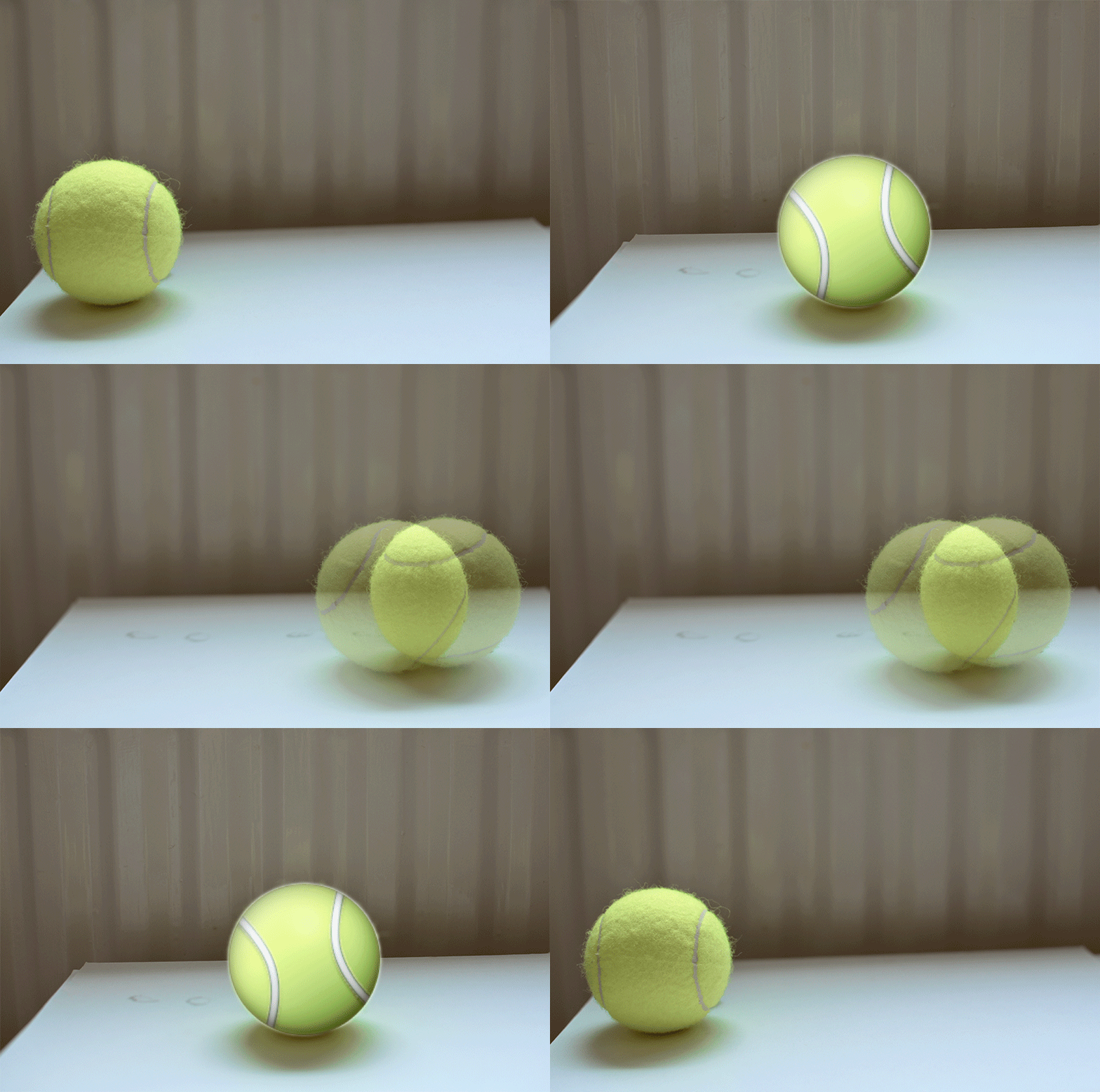
I shot five pictures of a tennis ball and created with these a Gif in Photoshop. I copied an emoji tennis ball from an internet page and replaced the ball from one of the photos with it.
I like the idea that emojis can become real like my tennis ball emoji. And who knows, because it is an emoji ball it may be now a living thing that can breath and feel and eat. Just an idea.
As an example of an assignment idea I have posted at the ds106 assignment bank, I have produced a piece of music, where you can hear a voice saying something over a beat.
I used Soundation to create a beat and exportet this as a .wav to my computer. After this I loaded the file into Audacity. In Audacity I recorded my voice saying 'One, two, Wow.' I did not choose the words for any meaning, but because I felt it right for my chosen beat.
A series of tutorials about how to produce pieces of music and how to share them on Soundcloud and Tumblr.
The first video shows you how to find the download page from a great free sound editing software called Audacity.
The next video shows you how to produce a beat with the free online software Soundation. When have created the beat it is opened in Audacity where a voice track is recorded. (You could record in Soundation, but not in the free version.)
The third video is about sharing a Soudcloud track on a Tumblr blog.
I once read a novel by a white reporter who is living in South Africa. It was about a fair haired little girl who was adopted by white South Africans who admired the Nazi regime. Some day they had to face that the little girl is Jewish, which caused that their behaviour turned against the girl. She from now on looked for friendship and support with the black people around.
However, this intro scene is not about this book, but about a story I have thought out myself, inspired by the book and people I know from Africa. The heroine of the story is a white girl growing up in a small village in Ghana.
You can see the hands of an adult woman starting to tell her story.
First
for any artwork production is the idea. You might already have one.
If not you might know about various brain storming techniques.
However, even then you need a start.
This
can be a question, for example:
I
want to show my artist friends something really awesome. What would
impress them?
Often
we got ideas from assignments a school provides.
You
may follow the idea I provide here, which is to juxtapose the visual
(photograph) to the audible (narration) in a video and to share this
in the Internet.
Please
note, this is not just about creating a video. You need this steps
for any kind of artwork, although the term pre-production is
normally used for the video production process.
When
you got your idea, write it down. One sentence may be enough.
I
want to make a photograph of white hands on a dark background and add
the narration “I am Hanna from Ghana”.
Say
something about the meaning you want to convey.
I
want people wondering about the juxtaposition of the visual and the
audible to make them think about their ideas from skin color and
origin of a person.
(you
may choose any other picture like the mouth of a bearded man sounding
like a child and saying: I am Hans from a Grimm fairy tale. Or you
show the back of a woman's head with braided hair saying in a man's
voice “I am Jimmy from Pimp Town.” - Sorry for this, but art
sometimes must be provocative to make people think.)
After
this for visual ideas you should do any kind of sketch. For a
video you might create a story board. For our purpose you can use any
form you like. Look at my one frame story board.
You
can do something similar for music and sound, like a time line or
musical notation.
Now
you have to explore what you need for your production. Compare it to
what you have. Write it down. If you do not have what you need write
down an alternative.
I need
I have
time, about 2 hours
I actually have two hours of time this Saturday.
hands
I will take my own hands.
a dark background
I have a cardboard box I will use.
camera to shoot the picture or the hands
I ow one myself and will use it.
(You may lend devices.)
a microphone to make the narration
I do not have any microphone. alternative:
I have my zoom recording device and will use it
for a microphone.
(You may have a
microphone, which I recommend for a better quality, or you use
your build in microphone.)
a software where I can make the narration with
I know I can add a narration to a video in the
Movie Maker. I will use this option for my production which anyway
results in a video.
(You may have to download
it: Click
to get the Movie Maker
Or use any other software
you know.)
a software where I can produce my video with,
which is combining visual and audible and export this as a video
I will use the Windows Movie Maker.
a platform where I can share my video
I have heard tumblr is a good place to share. I
will get an account there and share my video via this account.
Now
go on and produce!
This
will be the production part of your work. For the idea we are
following here it will be just taking the picture you need. You can
also see the narration as part of the production.
The
following picture shows how you can shoot for example and eye of
yourself. I have to mention that I can take single pictures with my
video camera. You may have any other device and an appropriate tripod
construction.
I
also show you a picture that displays how I have set up my microphone
which I have connected with an USB plug. You may have a microphone
that uses a jack plug, which also can be connected to your computer.
Next I will show you how to load the picture to the Movie Maker, how to make the narration and how to export your work as a video you can share, which can be called the post-production.
Share your artwork!
The next video shows how to share your artwork on a tumblr blog. (Naturally you can use any other blogging page.
I loved the title Song Visualization for one of the ds106 video assignments, which simply is making a music video.
Still, music video is more associated with Rock, Pop and other music associated with watching cool and crazy people. I, however intended to visualize how color is mixed from 3 primary colors and this video has turned out to be really cool.
Since I have a passion for mixing colors from just three primary colors, I was delighted when I found a Sesame Street video about this, which was spring '13 when I first tried video together with ds106. However I did not manage realizing my ideas about a music video I wanted to create from the song in spring. I still had to learn a lot about shooting (light) and video editing. Now, more than half a year later I tried.
It was fun but not easy. The day was cloudy and I had to add light, which again made the colors too yellowish especially the blue and purple. I was able to correct this with adobe premiere elements via an effect called 3-way-color-corrector.
Look here for the effect:
Finally look here for a picture of my editing screen:
You can see the clips a various. The reason is I had to interrupt the recording whenever I had to arrange the windmills or little glasses with color. You also can see that I sometimes have changed the opacity of a clip to achieve effects like crossfades. This, for example, helped creating the illusion that the colors of the little windmills are mixing.
This is possible with a record of you singing the canon once. Afterwards you have to listen to yourself and to start the next recording when the next voice comes in.
It is possible to cheat by recording the canon only once and copying it, but this is no fun and you may have difficulties to synchronise the parts.
For my recording I've chosen a canon which looks easy but is tricky, still, it has the nice effect to really achieve a multi-layered sound of voices.
The piece is in German, but below the notes I present a translation.
It takes little to be happy
And whoever is happy is a king.
While recording headphones should be used. Otherwise the sound which comes from the speakers is also recorded. This usually interferes with the quality of the recording.
A possible course is:
- plug in microphone and headphones
- start software
- start the recording of the canon according to your software's ways
- go back to the start of your recording
- add/ go to new track (if necessary; in Audacity a new track is automatically added)
and hit record
- start singing when the next part comes in
You can repeat this.
When I was a child and during my time at university I always was part of a choir and the above round is often sung in German choirs. For me this is a world far in the past. I still love listening to a polyphony if voices but can hardly imagine being in a choir with all the pink ideal world people around me. Still, the music they are producing is nice.
When I had to make a decision concerning a commercial for the ds106 radio project of fall 13, I took the text of Kevin's little comic and spoke the words into a microphone.
After this I opened an audio editing software and in a second track added a groovy sound I've found on freesound.org.
I also tried out some effects like echo and modulation to achieve a richer sound.
The logo for the soundcloud file I've created as my version for a logo for our group, which was anyone supposed to do.
This week is about design, and often about font, but when I chose the poster of the 9 movie to make a poster for a ds106 movie I was left to editing possibilities without using any font.
I copied the original and rotated the layer by 180 °. This way I got a 6. Then I selected the 6, cut it and put it on a new layer.
In the original I used the copy tool to 'paint' some of the background over the 9 . The same I did with the little nine at the bottom right.
I combined the six with the background via one of the blending modes. I tried them out until it looked good.
Finally I used the text tool to write DS10 near to the 6. I flattened the image and made the DS10 edges softer and floating with the mixing brush tool.
I thought about if I had any associations for the reason why I've chosen this particular poster. I definitely did not allude to the 9 movie. I think I liked the idea of a slight irony already implicit in the original poster. Naturally ds106 is important to many people including me, but we may not expect ds106 has to save us.
A further reason is that I find the poster a good design and I've enjoyed exploring it deeper by changing its design.
Since I've joined ds106 I was fascinated from the skull symbol, which is often used within ds106. This made me thought, for it is not necessarily a nice metaphor. Finally I knew what my link was here: Creativity!
According to my understanding of the skull metaphor I created a stamp. The idea I got from the ds106 assignmnent "ds106 Goes Postal", where you are supposed to create a stamp to honor ds106.
I took pictures from a website about Leonardo da Vinci and his anatomy drawings. I was fascinated from the asymmetry of the skull, which is again deathly creative. Look around, you will find a lot of skull drawings all very symmetric. Leonardo dares to draw a skull different.
However, I arranged the skull and the bones in my photo editing software and added the ds106 letters on the skull's forehead (like a postmark). The letters you can find on the ds106.us page.
Finally I wrote "#deatlyCreative" where normally the price of the stamp is to be found.
For the 'stamp edge' I took a picture of a stamp and selected the edge of the picture. I used this selection to cut out the edges of my picture.
So this is the way I would honor ds106 with a stamp.
Here you can see a Gif of an origami crane circling around its string and I like that my settings have caused a motion blur, that was not intended in first place.
I am fascinated by this simple movement, which is, because of the motion blur, rather something geometrical moving than a recognizable thing, what makes it very abstract.
I positioned my camera and touched the crane and when its movement has slowed down, took three pictures shortly one after the other. I loaded the three pictures into Photoshop as three different layers by using the place option. In Photoshop's timeline I added that any picture shall be displayed for half a second. Then I saved the Gif via the "Save for Web" option.
Two weeks since my last log. The peaceful concentration on dailycreates is past, there are many more creations to do, I managed three in 14 days, it is rewarding, still.
Already a week later, and by this late, I had the possibility to add to the dailycreate repository by doing a dailycreate, which I found an awesome idea. dailycreate tdc625: Create a new ds106 Challenge by Remixing a Previous One.
I took a random dailycreate, which I got by clicking the provided link.
Live, laugh, and love… take a picture that expresses good times.
After this I thought the really opposite would be to take a photo about sadness, but rather decided a photo of emerging from sadness would be more challanging.
Original assignment idea: Live, laugh, and love… take a picture that expresses good times. http://tdc.ds106.us/tdc501/
Newly submitted assignment idea: Cry, die, then fly … take a picture that expresses emerging from a crisis.
Then I dared something I've always wanted to do, a time lapse video, which is pictures taken over a long time combined to a video. I chose to make bubbles and shot how they are vanishing in time and finally becoming soapy water again.
Look here for tdc626: Make a time lapse video that shows a transformation.
How different was Cris' choice. First the color which is red and the highest temperature contrasted to my blue and then observing the merry behaviour of a human being instead of an inanimate appearance like bubbles, though both are enjoyable.
Finally I was surprised by me liking one of Ary's pictures, who I still know little, but I think we have something in common when choosing motives.
I would have liked to embed at least one video of the Create an I am ds106 / We are ds106 video clip dailycreate. I was not able to make a decision, for the contributions are all very awesome. Do not miss watching them, they are good and for those who never have time, they are short.
It is some time ago that I put down something to my daily create log. The last entry was about numbers and ds106, who had become 600 and whose name you can write backwards in many interesting ways (600 Skull Chain/ 601sd).
Even earlier I wrote about my first humble tries into the headless dailycreates, which wasn't easy for there was no head to tell me what to do (Initial Headless Yield).
Up to today, which is the 14th of September, you could have done 18 daily creates, from which I created 10. I think this is a great achievement, although I presume there have been headless creators, who were able to create more than this 18.
Although I missed to write into my log regularly I tried to keep an overview via my computer file.
However, after the vision of a Skull Chain I produced a video about my key chain.
It's a remix of a movie scene of "The Indian in the Cupboard" and media I've produced myself, like a photo, a very short clip showing me and a recorded audio, where I explain about my keychain doesn't say much about my life.
I loved this daily create, because I learned to know something about many people I mainly knew from their little pictures that are necessary to identify yourself online as a person, but that do not say much or even anything about the person behind.
Then I dared using a picture I've created while I attended one of the many coursera MOOC's which are not very popular with the former heads of ds106 because of their rigidity of presentation. For showing regret to have been so disloyal I made me headless, which had the effect, that the vivid and angry shark got even more into the center of the picture.
Then I did not dailycreate for some time, but because I liked Alan Levine's blog post from the other day, about dailycreates, where he presents his work together with work from other ds106ers, I want to present a dailycreate I liked because of the surprise I felt when reading it, especially the comment of Jenny(n).
Jenny(0) started writing a story about Jenny(1):

      Jenny(1) started writing a story about Jenny(2):

         Jenny(2) started writing a story about Jenny(3):

            Jenny(3) stopped writing.

         Jenny(2) stopped writing because Jenny(3) stopped writing.

      Jenny(1) stopped writing because Jenny(2) stopped writing.
Jenny(0) stopped writing because Jenny(1) stopped writing.
Stop, stop, stop all the writing
Give me time to breath.
Stop, stop, stop all the writing
Or I’ll have to leave.
Still, nice at it is to admire all the lovely and interesting creations of fellow participants, I had to go on with my own daily creates.
It had to be a black and white photo with high contrast of a maybe uninteresting object.
I put a shallot and garlic together with their peels on a drawing of a hand.
I also edited it with Gimp, although I already tried to make my camera present a high contrast.
I sought to make it even more interesting by using the bump map filter in the filter->map menu. I remembered to have read about it in a headless post, which is too long ago, so that it is rather difficult to find it. Thank you unremembered helpful girl.
Finally I framed the picture.
Very unsure of my creation, I thought: o.k. you can not possibly every day create outstanding images, which is anyway not the purpose of dailycreates, but what a surprise, it was liked ...
as well as people liked the following book cover idea, which I can understand. It has the lightness I am always happy about when it hits me; in the outside or for my own work.
The same with Guilia constantly creating doodles. This is a present I've never received (which is ok). When I try following my thoughts with the help of little drawings I am left behind completely helpless for the block in my head.
however, I've got to go on and I am really proud of the result of my next dailycreate, which was to design an alien postcard with Hubble photography.
This has a lot to do with masks I created in my new Photoshop. I am hardly aware of what I did, so sorry I can not give a detailed description.
I remember painting on a mask to 'paint away' the edges of the picture, and also interesting was to give the characters a black edge, where you have to use a rippling filter on. Then you select this black parts and on a mask for the characters you blacken the selected parts, the way they are erased in the image. Yes, it is sooooo complicated, but fascinating and it helps making the characters more integrated in the picture.
What I further realized is that participants often try to tell that, apart from the ds106 dailycreates, they have their personal daily creates like for example this picture below which is by Alan Levine, whose daily photography I highly admire and enjoy.
<Celebrate the 600th Daily Create! Express 600 in a drawing without using numbers. (dailycreate tdc600)>
When I had the idea of drawing 600 circles I thought this might be tedious. I rather decided to use my blender 3D and tell it to just arrange beads along a curve.
For a further dailycreate, I again used the skull picture to make an animated gif:
<This is TDC 601! That is 106 backwards! Draw something 106ish backwards. (dailycreate tdc601)>
I took the skull picture and loaded it into gimp. I duplicated the picture and with the clone tool "erased" the ds106 letters. I put a mask on the duplicated picture the way that the letters appear when I draw on the mask. I recorded me drawing/writing ds106 with a software called bandicam then I created single images the way it is done for a gif (ds106 handbook -> gif with open source).
I loaded the single images into gimp and flipped the image horizontally (image -> transform -> flip horizontally). Finally I saved all as a gif.
There once was a tiny enchanting world, but then a sorcerer came and put it into a tin. Why? Actually he was badly in love with the beauty of its inhabitants and landscape and gripped by jealousy while imagining any other sorcerer could look at it. Later, unfortunately, he forgot his love more and more and one day the tin dropped out of his cloak and he did not care and left it where it has fallen.
Some days ago I've found this world in a tin just when it was time to do my first headless dailycreate, somehow dented, but beautiful as it former was. I am now looking for possibilities of getting the world out of that tin. I may have to become a sorcerer myself.
I've started this intention by just trying to show the world's sea, but then I was utterly surprised by its self-will, while infiltrating my meditative clip with music and visual pieces.
Next day I asked the world to help me drawing a cute insect, but it rather wanted to draw something exciting like a bad spider. I tried to ignore the world's wishes, but the result was a big nothing, until I seized the last escape, Rochelle's certificate.
Strangely enough the next possibility of freeing the tiny tin world was easy, why ever. It may be that it is a great inspiration to create something for a person who has her birthday.
Finally I want to thank anyone who has enriched my week with their posts, creations, advice and nice comments, especially when it turned out to be a deeper communication.
Again I used Gimp to achieve this effect, which is known from many pop art designs by Andy Warhol.
I started by using from the Colors Menu the Threshold option, where the picture is changed into one with only black and white values. Then I added a new layer, which I provided with a color. I set the layer mode to Multiply. Any white area of the image has now the layer color. Finally, by creating new layers, I painted over the image and colord the hair, eyes and mouth. I used different layer modes to combine it with the image. Like this the black areas remain still noticeable.
Now it is easy to use from the Colors Menu the Hue-Saturation-Tool to change the hue and to combine images with different hues.
If you have more questions about the making-of, please ask me via the comment option.
When I wrote a letter to a fantasy character according to this day's dailycreate, I immediately thought about Buzz Lightyear from the Toy Story. He is a bit down and wasn't able to reject an invitation to tea, where a little girl makes him one of her female tea guests.
... but here is my letter. I, as many little girls, also once imagined me at a tea table with other "women" talking about this and that:
Liebe Frau Vogel,
Do you remember the meetings in my parents' garden so many years ago? When I discovered a neighbor's girl has gotten a tea set, so beautiful you can hardly imagine, white and with delicate flowers of pastel colors.
I did not tell anyone that I from now on wished so dearly to have a tea set, to invite friends and to talk about what goes on in the world.
Some days later I sat in a hidden part of the garden and you came along, just like that. You unpacked your bag with a most beautiful tea set with tea already in it and some delicious cake, already on the plates. Not long there came along three more friends, Frau Fink, Frau Amsel and Frau Star. We chatted about the farmer's family, where they have a bit of an unlucky atmosphere, and I've listen to the story of the lonely teacher, who still lives with his Mum. I actually felt just like a grown up woman like you were and for this I wore a beautiful flowered summer dress, like your dress.
All good things have an end and after you and my new friends have come about 7 times you told me at our last meeting that there are other little girls waiting for you to come and that I am now strong enough to go my way without you. That was OK, because the next day I met a girl, who became my friend for some time (it was the neighbor's girl with the tea set). Later there have been many more friends, with and without tea sets.
Thank you so much, Frau Vogel.
Forever,
your Stefanie
For the gif I have downloaded the Toy Story scene and added to the headless dolls some birds, which I have slightly animated.
I have chosen birds, because I named them after birds like Amsel (merle) or Fink (finch).
Three reasons for my favorite word, which evokes charming images in front of me, three reasons for three words: Kirsche or cherry for a sweet dark red fruit, Kirschbaum or cherry tree for the lovely cherry blossom and Kirschbaumholz or cherry(tree)wood for the beautiful and warm look of cherry wood.
There once was a green lizard, that got lost in an apartment house. First it thought the origami planet looks so nicely like me, maybe I can talk to it, but it did not answer and the lizard got sad. The green lizard found consolation when it tasted the delicious green salad and when the little saurian turned around there even were strawberries, which it just smelled because the color has gone to where the red home lives. The lizard wanted to try some flowers, but they again were just from paper and not eatable. Last the green little animal sniffs the different kinds of tea and liked this much, but did not try eating them. The lizard had to go for it rather likes living outside, although it thought I might come back one day or I will go to the red home where I can try to become a red lizard.
Actually I did not use an editing software for making only one color visible, but used a mode on my camera where you can set up the color which will be visible. Still, I had to use Gimp for arranging the images. I just used the Move Tool together with the option "Pick a layer or guide". I also used the Rectangle Select Tool to add a border to each image, while using Menu -> Edit -> Stroke Selection.


Give me time to breath.
Stop, stop, stop all the writing
Or I’ll have to leave.