Pages

Showing posts with label MashupAssignments. Show all posts

Sunday, May 5, 2013

Gimp Rotoscoping Tutorial

This tutorial I am doing aside an assignment idea I've posted on ds106's assignment bank.
I'm going to explain how you can contour something in Gimp with the Path Tool to gain an exciting animated gif. You also can use a tablet and pen, it is just not what I'll show here. I thought people without a tablet should also be able to do this assignment.


For this tutorial you need to know how to make single images from a video clip and how to import the images into Gimp. You can read about this in the ds106 handbook. Or go to a different tutorial I have created and look for a video on this.

Once you have imported the images do the following:

Choose Shift + the eye symbol of the bottom layer in the layer tab to make only this layer visible.


Next create a new layer by clicking the New Layer symbol (1) in the layer tab. Choose a white background (2) and name the layer 0001 (3).  (The next will be 0002 and so on.)


After This set the Opacity of the layer to 50%..


Now it is a good idea to zoom in where you want to start drawing the outlines. Just enough to keep an overview.
(Zoom Tool or Ctrl + Mouse Wheel together with Space Bar + Left Mouse Button)

After you have selected the Path Tool, click along the outlines. (If possible don't move the mouse while clicking, you may come into the edit mode, where you can shape the path.)
If you reach the edge of the screen just use the Space Bar together with the Left Mouse Button to move the visible part or just use the scroll bars.
Don't overdo this, we are going for the motion, not for the detail. Maybe I've already set too many points.


When you've finished your first outline, click Stroke Path (1)  at the Tool Options palette of the Path Tool. Then choose a Line Width (2) and confirm.  (I've chosen 3 appropriate to the resolution of my image. You may need a different width.)
Normally the stroke will appear in black, which is the default foreground color. For changing the stroke color, change the foreground color.


To position the path tool anew you have to select another tool first and then again choose the path tool. (There may be a better ways which I don't know.)
For the ball you can use the Ellipse Select Tool plus in the Edit menu Stroke Selection.

When you've finished the outline of your first image set the layer opacity back to 100%. The result should look something like this.


You now can delete the layer with the original image or you can do it when you've finished all images.

Go back to the start of this tutorial and do the same with any of the imported images.

When you've removed the original images you can play back the action.
Go to Filters in the menu bar and choose Animation -> Playback.

Maybe you have to scale the image now. For an animated gif the image should not be larger than 800 in width. In the end this is up to your choice, but note if you save something as a gif file the file size is restricted. The more images you need the smaller they have to be.

Just try to save your work as a gif file now (File menu -> Export to -> Filename.gif). If it is too large you will have a pop up window which tells you about this.

Don't forget to check the option As Animation.

You should also experiment with the delay between the frames, to find out which speed is the right for your animated gif.


Go to your gif file and open it in any preview. I personally open it with the internet explorer. If you're fine with the result you're done. If not correct what ever you want, but don't forget that there are many more assignments to do.

Wednesday, May 1, 2013

Tap Dancing

This video for my final project means to show a group of dancers and their art, for which they have been arrested. It is just a dance, but the authorities of Thasis consider this an act of dangerous creativity, because it is not at all productive.


I created a mashup assignment for this video, where I propose to rotoscope a dance or sport sequence. Unlike the assignment description I draw the outlines with a pencil on paper and scanned the drawings. I used my video editor by adding the scans and combining them with the sound of the original video.

Monday, April 22, 2013

C.Doctorow - Mysterious and Colorful

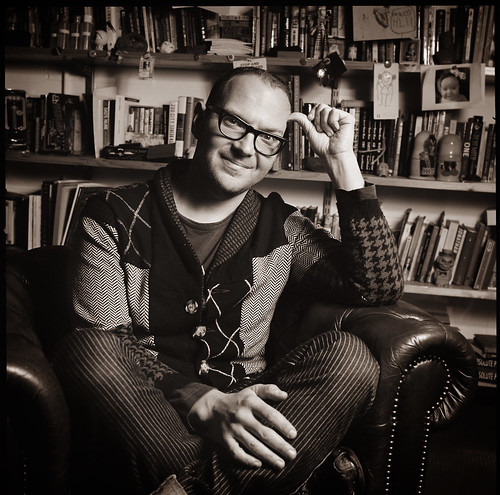
This is meant to be a remix of one of Jonathan Worth's photographs of Cory Doctorow. I learned from Jonathan's project where he invites people to remix his images from Cory, because I attend the open online community ds106, where theidea is listed in the assignment bank.

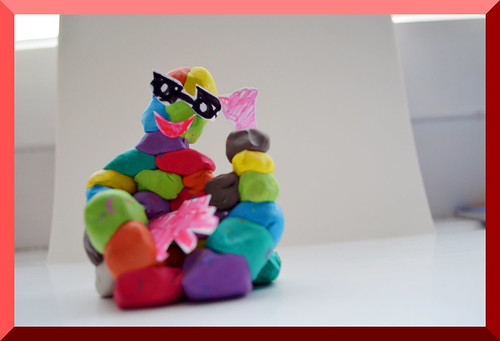
I also read about this on Alan Levine's blog post on the project. This post was also my first inspiration, concerning the idea of Cory Doctorow as a wise man. I just thought a wise man living in our world must be more modern and because I see popular literature as colorful and lifely all became a mysterious and colorful sculpture; mysterious, because what I've read from Cory's  novels I found mysterious.

SculptureBorder

I've photographed the sculpture and now my work has become a funny postcard.

Here you can see the original image by Jonathan Worth.

cory004f1_duo


How this is made? Look at my desk:

So sorry, but the picture of my desk got lost ☹

On the screen you can see the photograph of Cory Doctorow and on my desk Play-Doh, felt-pens, paper and scissors. I took little pieces of the Play-Doh and build the sculpture with this pieces. I also drew some glasses and two hands and cut them out and pressed this paper cuts into the Play-Doh at the right spot.
Creating like this I remember my professor in art university Andrea Tippel. She always said "Die Mühe lassen wir jetzt mal weg" which means in English something like "Just leave behind having trouble while making art.". She wanted to say that there can not be any art where you trouble yourself too much.


Creative Commons License
This work is licensed under a Creative Commons Attribution 3.0 Unported License.


Sunday, April 21, 2013

Just A Mum

When I saw  something about a Youtube Duet I asked myself what the last song is I can remember I listened to, because for more then 15 years I haven't listen much to popular music but rather classical music.

Finally I did remember that there was a young woman who sang about her mother, so I typed in mother and got this link: https://www.youtube.com/watch?v=gZ2tluarzZs, which leads you to a video of the performance of “Mother” byRoger Waters & Sinead O'Connor. I knew it is not the song I've looked for, yet it is the singer who sang the song and I recalled the lyric includes a garden and flowers; the right words to find the right song “Nothing compares2U” by Sinead, 1989. For this I chose a video on youtube that combines a slideshow of landscape images with the song. I did a mashup of the two videos by making one partly transparent and emphasized sometimes one of the songs by pushing up the volume. This comes out very nicely.


"Mother" feels harsh, for it describes the mother of a boy or man as making him dependent on her by inducing fear to live his life. I thought this rather interesting to me because the song I remembered was a song about someone who has loved their Mum* but she has died recently. That Sinead sings both songs I find compelling.
In the end I could not understand that in both songs nothing is mentioned about that mothers are only people and for my post chose the title "Just A Mum".

*maybe it is about her boyfriend, who has left her; I find the song rather ambiguous, especially the melancholy style which implies rather singing about a lost mother than a lost boyfriend

Saturday, April 20, 2013

Blue White Red Insight

A mashup from the trailers of the trilogy "The three colors Blue White Red".

This trilogy is meant to be about love and loss, which I can agree with. Still, it is also a lot about watching people's privacy and coming nearer to some, maybe unpleasant, truth. This I tried to catch in my trailer version.


I took several clips from the three trailers and combined them like I thought they will convey my interpretation of the three films. I further worked on the colors of the clips, which was a bit annoying for you can not choose multiple clips in premiere elements to edit them together, but finally I reached what I've imagined earlier.

For the sound I worked on the volume of the clips and mixed the different soundtracks from the different trailers, so that here and there the audio sounds discordant. This way I tried to emphasize that it is about the unpleasant experience to find out an inconvenient truth.

I did not feel very sure of how to create a mashup, when I started the editing, but I now have an idea of what it means to do a mashup of different video content and maybe my next mashup will be already very artistic and skilful. Yet, I like the result, which gives me the feeling of having brought a piece of my inner world into the outside, while the original trailers didn't show anything of this. How does this work?

The trailers you can find via the below links:
Blue:
http://www.youtube.com/watch?v=Hxu6my_t4pM

White:
http://www.youtube.com/watch?v=DTLlk6FIP3I

Red:
http://www.youtube.com/watch?v=vKA_4iycWq4

Wednesday, April 17, 2013

Media Metamorphoses

Click the audio for the story.


For this assignment "Storytelling with Recycled Media" you were obliged to take media from a page on minus.com, where ds106 students earlyer have uploaded media, for which they themselves have no use. Unfortunately there's a lack of videos and I've missed the videos I've upoaded. I presume somthing went wrong during the uploading process.

Still, the media are interesting and because I wanted something move I chose pictures to make animated gifs from them. I used a filter in Gimp to blend two images over a background. You can find it in the menu Filters -> Animation -> Blend. Here you can choose how many steps you need for the blending. After the filter has applied you can playback the animation (menu Filters -> Animation -> Playback.) I saved the file as an animatied gif.

I also chose 3 sounds and mixed them to one file which tells the story requested for the assignment.

Tuesday, April 16, 2013

Going on Vacation

Where to send Alan Levin on vacation? A difficult question when you hardly know someone. From his photos I know he already has been to many places anyway. Maybe I should send him to a kind of inner journey, I imagined.
Sometimes when I were on vacation I just thought how nice it would be if I could do all the things I wanted to do for so long a time. This way I tried to understand which this could be for Alan and I hope I am not completely wrong. Anyway, right or not it is a nice video.


The idea is to mash up a video by Alan Levine with pictures, google maps, soundcloud songs or twitter searches. Alan provides spaces within the video where you can add the appropriate media. This should be done with an online editor for mashing up called Mozilla Popcorn Maker. I tried, but it did not work for me at all. First I struggled to start it from the "Weekly-Stuff-To-Do-Side", but did not succeed. Then I copied the Youtube video to the Popcorn editor and added the media, but when I tried to add a soundcloud song the editor stopped working. I also tried the preview and had to realize that the media did not appear at the right place. I skipped the idea of editing with Popcorn and proceeded with my video editor.

First I did not know at all what to add, but then I saw a picture from a child sitting in a bin which seemed to fit nicely to the video. I then went on with the idea of presenting things which are related to all what we can not afford thinking of when we are adults with a strict schedule. This way I added
a picture of a website about "The Thief Lord", which is a childrens story about children lost in venice and adults who wants to be children again and a twitter search result about "The Thief Lord" and Venice. You can hardly realize both, because I tried to fit it onto the screen in the video.
You further can see a video of a growing tulip and another of a mouse sleeping side by side with a kitten, which I both trimmed to get the appropriate clip. I also added a song about someone who thinks about how it is to be an adult instead of a child. And last but not least the destiny of the journey has become a vidoe about a talented guitar playing little boy.